Kubernetes 101: A No-Nonsense Guide from One Beginner to Another

Kubernetes ☁️
Imagine This
You're watching Netflix at 9 PM — peak hours. Millions of people are online, all streaming their favorite shows. Ever wondered what would happen if all of a sudden, even more users jump on the app and everything crashes?
But it doesn’t.
And that’s where the magic of Kubernetes comes in.
Behind the scenes, there’s a powerful orchestrator—grinding in the back for your uninterrupted movie session. That orchestrator is Kubernetes.
A Quick History of K8s
The story of Kubernetes starts way back in 2003–2004 at Google. At the time, they built an internal project called Borg—a large-scale system to manage massive workloads across thousands of servers and clusters. Borg was followed by another system called Omega, and eventually, in mid-2014, Google released Kubernetes as an open-source version of their internal cluster manager.
The name "Kubernetes" comes from the Greek word for “helmsman” or “pilot,” and within just a few months of its release, major players like Microsoft, Red Hat, IBM, and Docker joined the Kubernetes community. In 2015, Kubernetes version 1.0 was officially released and later donated to the Cloud Native Computing Foundation (CNCF). The rest is history.
🤔 What Is Kubernetes, Really?
Kubernetes, also written as K8s (because there are eight letters between "K" and "s" — clever, right? 😄), is an open-source container orchestration platform. In simple terms, it helps manage applications that run in containers, like those built with Docker. When you're running multiple containers, things can get messy, especially when your app grows in scale. Kubernetes steps in to make sure containers are deployed correctly, kept healthy, and scaled appropriately based on demand. It handles things like service discovery, load balancing, resource allocation, and even self-healing. So if a container crashes, K8s restarts it automatically. Pretty cool, huh?
Understanding the Kubernetes Architecture
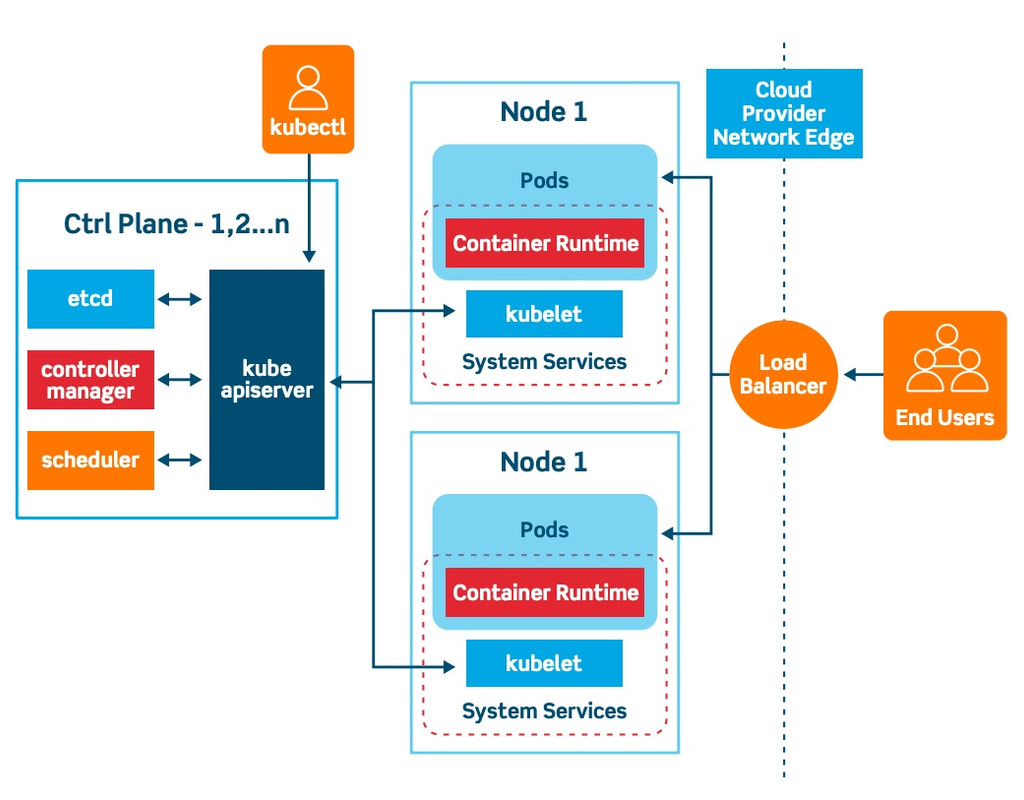
At its core, Kubernetes has a decentralized architecture. It doesn’t operate in a straight line or sequence—it’s built around a declarative model. That means you define the desired state of your app (like “I want 3 copies of this service running”) and Kubernetes figures out how to make it happen.
The Control Plane, also known as the Master Node, acts as the brain of the system. It makes all the important decisions—like scheduling apps, scaling them up or down, and handling traffic. Then you have the Worker Nodes, which are the machines (virtual or physical) where your application’s Pods actually run. A group of these nodes working together forms a Cluster, which is basically your full environment.
What Does Kubernetes Actually Do?
Kubernetes takes on a lot of operational headaches for developers and DevOps engineers. First, it automatically restarts any containers that fail, without needing human interaction. It also keeps multiple replicas of your application running. So if one replica goes down, Kubernetes replaces it instantly with a fresh one—no chaos, no downtime.
If traffic to your app spikes—let’s say you're hosting a flash sale and suddenly have 10,000 users—Kubernetes load balances the traffic across all replicas so your servers don't choke. And when that traffic goes back down, Kubernetes can scale down those replicas to save resources. It’s all done automatically, making your infrastructure smart and responsive.
Core Concepts in Kubernetes
To understand Kubernetes better, let’s talk about a few key concepts that form its foundation.
Pod – The smallest and most important unit in Kubernetes. A Pod wraps around one or more containers and acts like a tiny package containing your app. Think of it as a delivery box with your application inside.
Node – A Node is essentially a machine—either virtual or physical—that runs the Pods. It handles the actual workload of your application.
Control Plane – This is the brain of the Kubernetes system. It manages everything by making decisions about deployments, scaling, traffic routing, and overall system health.
Cluster – A Cluster is a group of Nodes working together as a single system. This setup allows your app to be distributed, scalable, and fault-tolerant.
Orchestration – This refers to Kubernetes’ ability to automate the deployment, scaling, and management of containers, ensuring everything runs smoothly without manual intervention.
Some Basic K8s Commands
Here are a few Kubernetes commands that I used and found super helpful:
| Command | Description |
kubectl get nodes | Get all nodes in the cluster |
kubectl describe nodes | See detailed information about each node |
kubectl get pods | List all Pods in the default namespace |
kubectl delete pod <pod-name> | Delete a specific Pod |
kubectl get deployments | List all active deployments |
kubectl create deployment <name> --image=<image> | Create a new deployment |
kubectl get services | View all services |
🧑💻 My Learning Journey
Like many beginners, I faced issues getting started. I struggled with installing Minikube locally—similar to the problems I had earlier with Docker (check out my last blog for the drama 😅). Eventually, I found KillerCoda, an awesome virtual learning platform with pre-configured Kubernetes labs. That’s where I ran my first Pod. At first, reading YAML files felt like deciphering alien code. But once I grasped the flow of how Pods, Services, and Deployments work, everything started making sense. Right now, I’m building a mini project that deploys a Python application across three replicas with auto-scaling based on demand.
Wrap-Up
Kubernetes isn’t just another buzzword floating around Twitter. It’s the real deal — the foundation for scalable, reliable cloud-native applications. Whether you’re just starting out or looking to upgrade your infrastructure game, learning Kubernetes is absolutely worth it.
In my next blog, I’ll walk you through writing your first Kubernetes YAML file and deploying your first app using Minikube or KillerCoda — with clear, beginner-friendly steps.
Thanks for Reading!
If you liked this blog or have any questions, let’s chat!
I’d love to hear your thoughts, ideas, or even your own beginner K8s journey.


