Getting Started with GitHub Actions: Your First Workflow Explained
A beginner’s guide from a beginner

Hello everyone, welcome to my latest blog!
In this post, I’ll walk you through one of the most powerful tools integrated into GitHub — GitHub Actions. It’s the hero behind automation in modern development workflows.
What Really Happens When You Push Code?
Ever pushed code to your GitHub repository and noticed that tests automatically run, or a deployment happens instantly? Or maybe your documentation site updates automatically with every commit to the main branch?
This seamless automation is powered by GitHub Actions. It listens for events in your repository — like a push or pull request — and executes predefined tasks such as testing code, deploying apps, or generating builds.
What is CI/CD?
CI/CD stands for Continuous Integration and Continuous Deployment (or Delivery). It's a set of practices that enables development teams to deliver code changes more frequently and reliably.
Continuous Integration (CI) is the practice of frequently integrating code changes into a shared repository. Automated tests are then run to detect issues early.
Continuous Deployment (CD) extends CI by automatically deploying all validated changes to production, making the release process faster and less error-prone.
Together, CI/CD automates the software release process, making development faster, safer, and more efficient.
What is GitHub Actions?
GitHub Actions is GitHub’s built-in CI/CD and automation tool. It allows you to create workflows that are triggered by GitHub events — like a push to a branch, a new pull request, or even the creation of an issue.
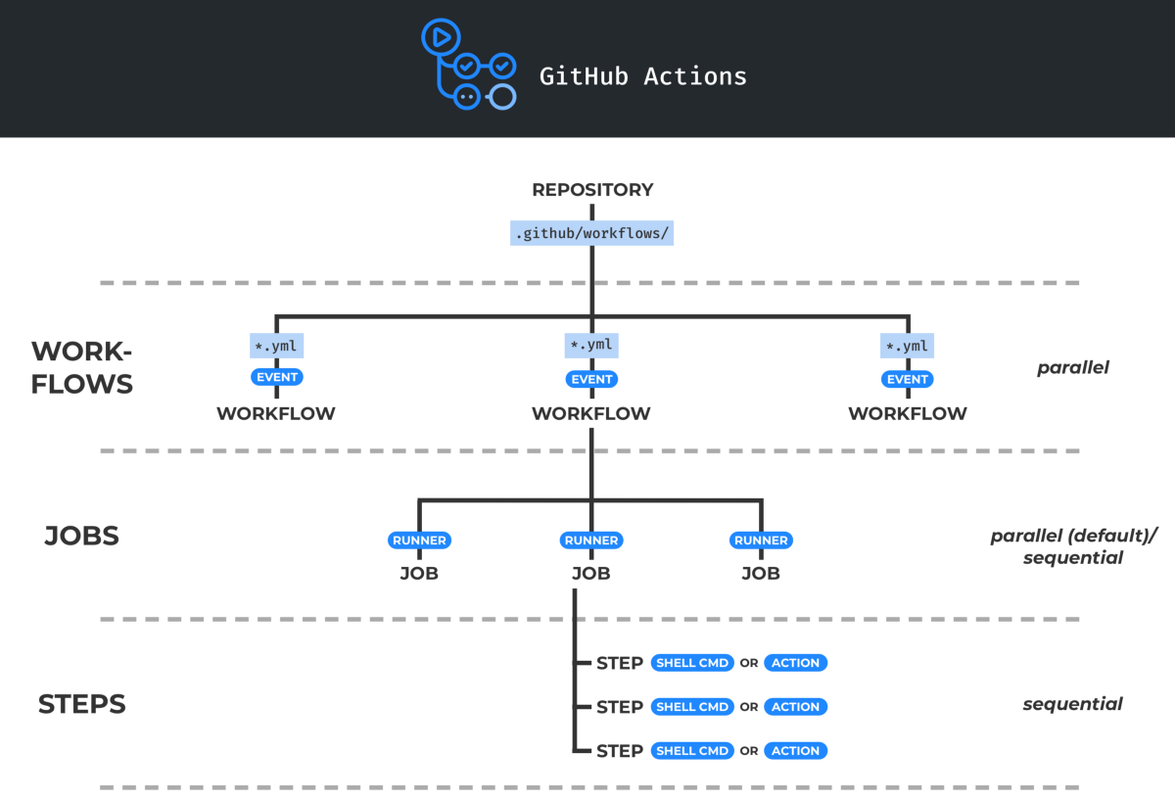
These workflows are defined in .yml files under the .github/workflows/ directory in your repository. Each workflow defines what should happen when triggered, what environment it should run on, and which steps to execute.
Why GitHub Actions?
Before GitHub Actions, developers often relied on tools like Jenkins or Travis CI. While these tools are powerful, they come with their own challenges:
- Complex Setup: Jenkins often requires managing your own infrastructure, handling plugin updates, and dealing with configuration overhead.
- Lack of Native Integration: External CI tools require manual webhook setup or API integrations with GitHub.
- Scaling Issues: Self-hosted solutions demand manual scaling, which can be both time-consuming and expensive.
GitHub Actions addresses all of these issues by offering:
- Seamless GitHub Integration: Defined directly in the same repository.
- Event-Driven Automation: Workflows trigger based on GitHub events like pushes, pull requests, issue comments, and more.
- Unified Experience: View workflow logs, artifacts, and configurations all within GitHub’s UI.
“Still using Jenkins for everything? That’s like renting DVDs in 2025 — ever heard of Netflix?”
A Simple Workflow Example
Let’s look at a very basic GitHub Actions workflow:
# .github/workflows/hello-world.yml

name: Hello World Workflow

on:
  push:
    branches:
      - main

jobs:
  build:
    runs-on: ubuntu-latest

    steps:
      - name: Checkout repository
        uses: actions/checkout@v4

      - name: Print greeting
        run: echo "Hello from GitHub Actions!"

      - name: Display current directory
        run: pwd

      - name: List files
        run: ls -la
Workflow Breakdown
This workflow is triggered whenever a push is made to the main branch. The name field is a label for this workflow that will appear in the GitHub Actions tab.
The on keyword specifies the event that will trigger this workflow. In this case, it listens for a push to the main branch.
The jobs section defines what tasks will be executed. Here, we have a single job named build, which will run on the latest version of an Ubuntu-based virtual environment.
Within steps, each block represents a specific action:
- Checkout repository: Uses a predefined GitHub Action to pull down the repository’s contents so it can be accessed during the workflow.
- Print greeting: A simple shell command that prints a message.
- Display current directory: Uses the
pwdcommand to show where the workflow is running. - List files: Lists all files in the directory, including hidden files, with detailed information like permissions and size.
This kind of workflow is perfect for getting started, testing your workflow setup, and verifying that your triggers and runners are working properly.
Docker Build & Push with GitHub Actions (Securely)
Now let’s take it one step further. Suppose you want to automatically build a Docker image from your source code and push it to Docker Hub every time you push to the main branch. Here’s how you can do it using GitHub Actions:
name: Docker Build & Push

on:
  push:
    branches: ["main"]

jobs:
  build-and-push:
    runs-on: ubuntu-latest
    steps:
      - name: Checkout
        uses: actions/checkout@v4

      - name: Login to Docker Hub
        uses: docker/login-action@v3
        with:
          username: ${{ secrets.DOCKERHUB_USERNAME }}
          password: ${{ secrets.DOCKERHUB_TOKEN }}

      - name: Build and Push
        uses: docker/build-push-action@v5
        with:
          context: .
          push: true
          tags: |
            ${{ secrets.DOCKERHUB_USERNAME }}/my-app:latest
            ${{ secrets.DOCKERHUB_USERNAME }}/my-app:${{ github.sha }}
What’s Happening in This Workflow?
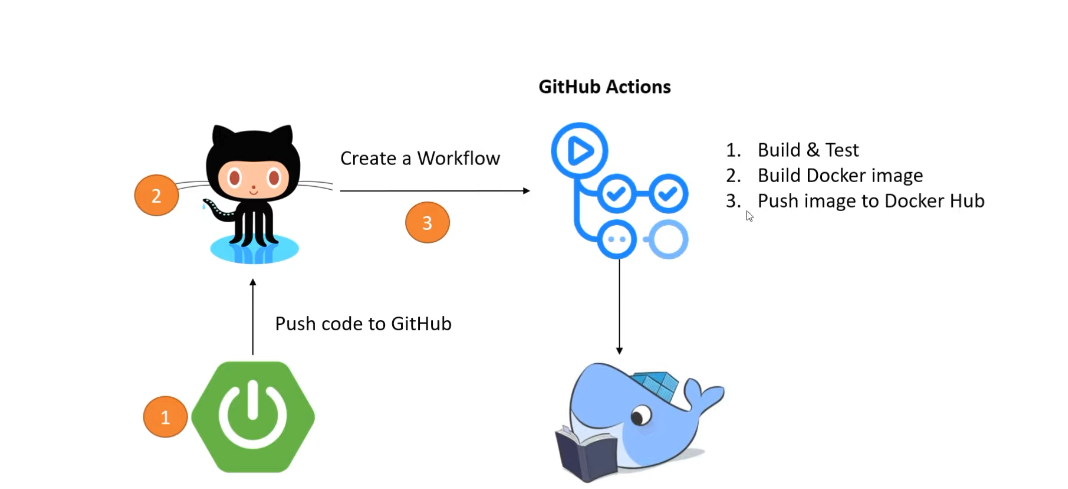
- Checkout: Pulls the code from your repository.
- Login to Docker Hub: Uses your Docker credentials stored securely as GitHub Secrets to log in.
Build and Push:
- Uses the current directory as the Docker build context.
- Builds the image using your Dockerfile.
- Tags the image twice: once with
latestand once with the Git commit SHA (useful for tracking). - Pushes both tags to Docker Hub.
To store secrets, go to your GitHub repository → Settings → Secrets and Variables → Actions → New repository secret. Add your DOCKERHUB_USERNAME and DOCKERHUB_TOKEN (access token, not your password).
GitHub Actions Marketplace
GitHub offers a wide variety of prebuilt Actions you can integrate into your workflows. Whether you want to lint code, run tests, send Slack notifications, or deploy to Kubernetes, there’s likely a reusable action already available. Browse the GitHub Actions Marketplace to explore these options.
Secrets & Security
Security is crucial in CI/CD pipelines. GitHub Actions provides a built-in, encrypted secrets manager to store API keys, tokens, and other sensitive data. Never hardcode secrets in your workflow files. Once exposed in Git history, they remain vulnerable—even if you later delete them.
Use the secrets context in your workflow files to reference sensitive values securely.
Final Thoughts
GitHub Actions simplifies the process of building, testing, and deploying software directly from your GitHub repositories. It removes the need for complex integrations and external tools, providing a seamless, scalable, and secure solution for modern DevOps workflows.
Whether you’re a beginner writing your first hello-world.yml or an advanced user building multi-stage deployment pipelines, GitHub Actions provides everything you need to automate with confidence.
Where to Go from Here
If you're feeling confident with the basics, you might want to explore more advanced features of GitHub Actions:
- Create matrix builds to test across multiple environments.
- Use caching to speed up builds.
- Connect Actions with tools like Helm, Kubernetes, or popular cloud platforms.
You could also try:
- Building CI/CD pipelines for your personal portfolio site.
- Automating test pipelines for projects built with Python, Node.js, or Go.
Resources to Explore More
Connect With Me
If you enjoyed this blog kindly drop a like or have any feedback, feel free to reach out:
- GitHub: Ayushmore1214
- LinkedIn: Ayush More


